When to configure proxy settings
Elastic Cloud Serverless projects are autoscaled environments, fully managed by Elastic and available on Elastic Cloud. Availability This functionality is generally available and ready for production usage. Serverless interfaces and procedures might differ from classic Elastic Stack deployments. The Elastic Stack includes Elastic's core products such as Elasticsearch, Kibana, Logstash, and Beats. Availability This functionality is generally available and ready for production usage. Unless stated otherwise on the page, this functionality is available when your Elastic Stack is deployed on Elastic Cloud Hosted, Elastic Cloud Enterprise, Elastic Cloud on Kubernetes, and self-managed environments. This documentation corresponds to the latest patch available for each minor version. If you're not using the latest patch, check the release notes for changes.
Serverless
Generally available
Stack
Generally available
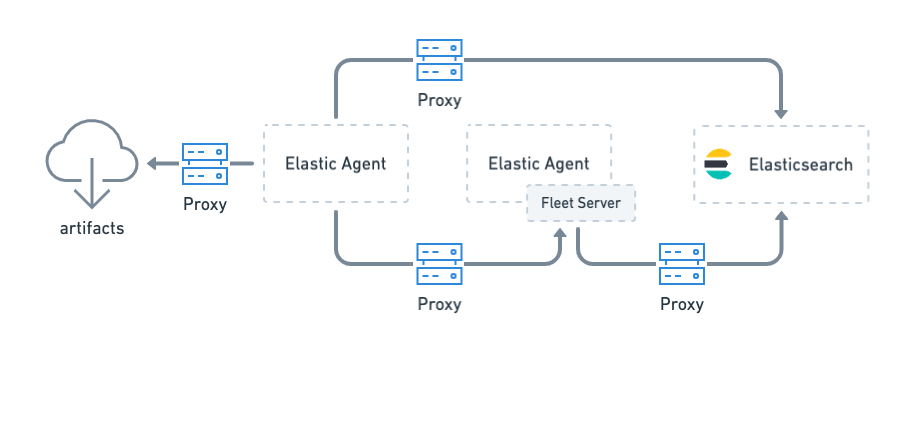
Configure proxy settings for Elastic Agent when it must connect through a proxy server to:
- Download artifacts from
artifacts.elastic.cofor subprocesses or binary upgrades (use Agent binary download settings) - Send data to Elasticsearch
- Retrieve agent policies from Fleet Server
- Retrieve agent policies from Elasticsearch (only needed for agents running Fleet Server)
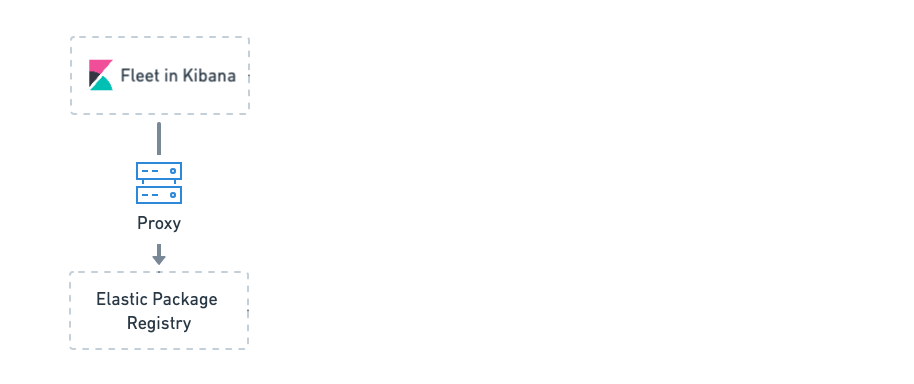
If Fleet is unable to access the Elastic Package Registry because Kibana is behind a proxy server, you may also need to set the registry proxy URL in the Kibana configuration.