Timeline schema
Elastic Cloud Serverless projects are autoscaled environments, fully managed by Elastic and available on Elastic Cloud. Availability This functionality is generally available and ready for production usage. The Elastic Stack includes Elastic's core products such as Elasticsearch, Kibana, Logstash, and Beats. Availability This functionality is generally available and ready for production usage. Unless stated otherwise on the page, this functionality is available when your Elastic Stack is deployed on Elastic Cloud Hosted, Elastic Cloud Enterprise, Elastic Cloud on Kubernetes, and self-managed environments. This documentation corresponds to the latest patch available for each minor version. If you're not using the latest patch, check the release notes for changes.
Serverless Security
Generally available
Stack
Generally available
The Timeline schema lists all the JSON fields and objects required to create a Timeline or a Timeline template using the Create Timeline API.
All column, dropzone, and filter fields must be ECS fields.
This screenshot maps the Timeline UI components to their JSON objects:
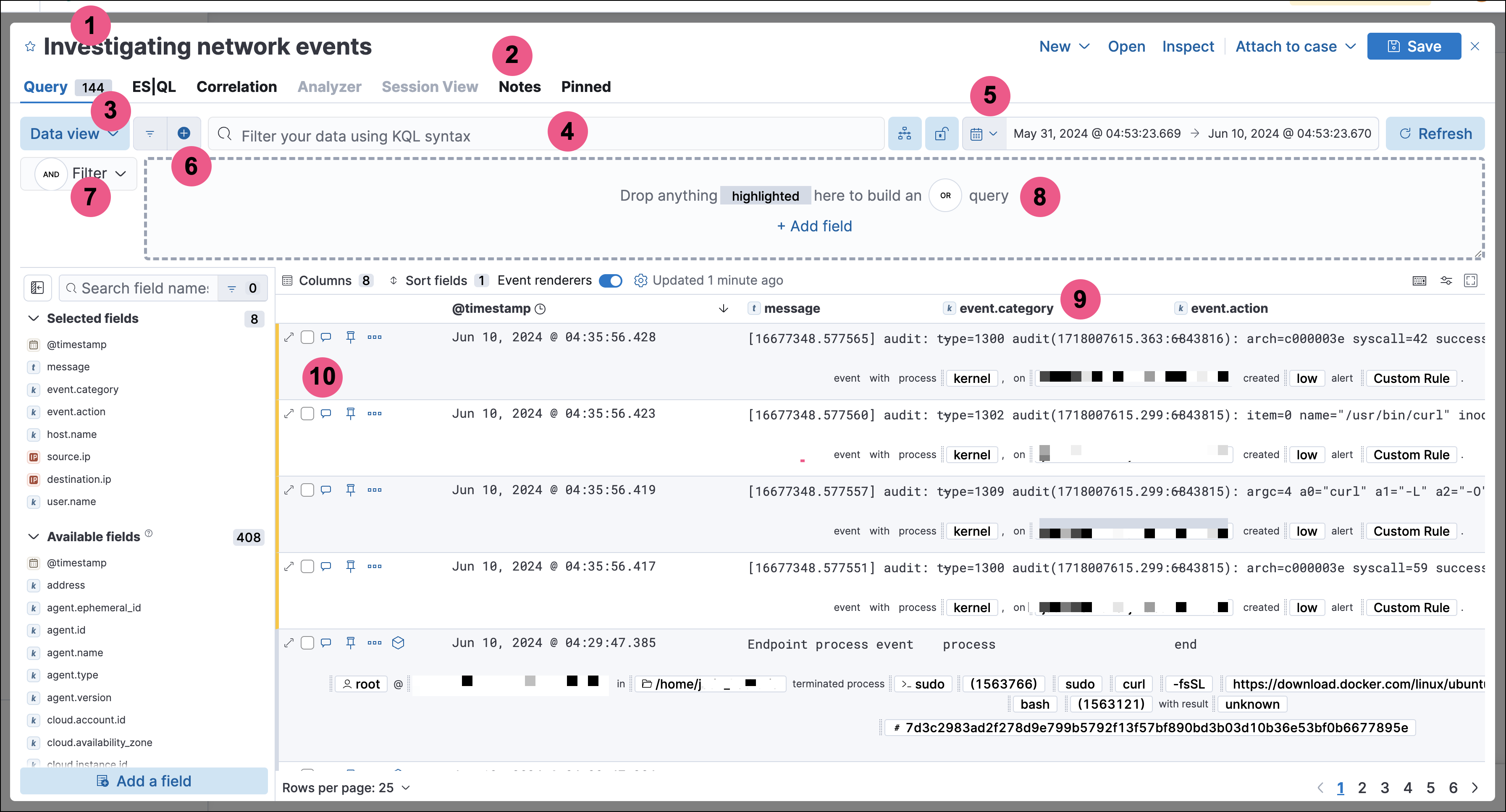
- Title (
title) - Global notes (
globalNotes) - Data view (
dataViewId) - KQL bar query (
kqlQuery) - Time filter (
dateRange) - Additional filters (
filters) - KQL bar mode (
kqlMode) - Dropzone (each clause is contained in its own
dataProvidersobject) - Column headers (
columns) - Event-specific notes (
eventNotes)
| Name | Type | Description |
|---|---|---|
columns |
columns[] | The Timeline’scolumns. |
created |
Float | The time the Timeline was created, using a 13-digit Epochtimestamp. |
createdBy |
String | The user who created the Timeline. |
dataProviders |
dataProviders[] | Object containing dropzone queryclauses. |
dataViewId |
String | ID of the Timeline’s Data View, for example: "dataViewId":"security-solution-default". |
dateRange |
dateRange | The Timeline’s search period: - end: The time up to which events are searched, using a 13-digit Epoch timestamp.- start: The time from which events are searched, using a 13-digit Epoch timestamp. |
description |
String | The Timeline’s description. |
eventNotes |
eventNotes[] | Notes added to specific events in the Timeline. |
eventType |
String | Event types displayed in the Timeline, which can be: - All data sources- Events: Event sources only- Detection Alerts: Detection alerts only |
favorite |
favorite[] | Indicates when and who marked aTimeline as a favorite. |
filters |
filters[] | Filters usedin addition to the dropzone query. |
globalNotes |
globalNotes[] | Global notes added to the Timeline. |
kqlMode |
String | Indicates whether the KQL bar filters the dropzone query results or searches for additional results, where: - filter: filters dropzone query results- search: displays additional search results |
kqlQuery |
kqlQuery | KQL barquery. |
pinnedEventIds |
pinnedEventIds[] | IDs of events pinned to the Timeline’ssearch results. |
savedObjectId |
String | The Timeline’s saved object ID. |
savedQueryId |
String | If used, the saved query ID used to filter or searchdropzone query results. |
sort |
sort | Object indicating how rows are sorted in the Timeline’s grid: - columnId (string): The ID of the column used to sort results.- sortDirection (string): The sort direction, which can be either desc or asc. |
templateTimelineId |
String | A unique ID (UUID) for Timeline templates. For Timelines, the value is null. |
templateTimelineVersion |
Integer | Timeline template version number. ForTimelines, the value is null. |
timelineType |
String | Indicates whether the Timeline is a template or not, where: - default: Indicates a Timeline used to actively investigate events.- template: Indicates a Timeline template used when detection rule alerts are investigated in Timeline. |
title |
String | The Timeline’s title. |
updated |
Float | The last time the Timeline was updated, using a13-digit Epoch timestamp. |
updatedBy |
String | The user who last updated the Timeline. |
version |
String | The Timeline’s version. |
| Name | Type | Description |
|---|---|---|
aggregatable |
Boolean | Indicates whether the field can be aggregated acrossall indices (used to sort columns in the UI). |
category |
String | The ECS field set to which the field belongs. |
description |
String | UI column field description tooltip. |
example |
String | UI column field example tooltip. |
indexes |
String | Security indices in which the field exists and has the sameElasticsearch type. null when all the security indices have the field with the sametype. |
id |
String | ECS field name, displayed as the column header in the UI. |
type |
String | The field’s type. |
| Name | Type | Description |
|---|---|---|
and |
dataProviders[] | Array containing dropzone query clauses using ANDlogic. |
enabled |
Boolean | Indicates if the dropzone query clause is enabled. |
excluded |
Boolean | Indicates if the dropzone query clause uses NOT logic. |
id |
String | The dropzone query clause’s unique ID. |
name |
String | The dropzone query clause’s name (the clause’s valuewhen Timelines are exported from the UI). |
queryMatch |
queryMatch | The dropzone query clause: - field (string): The field used to search Security indices.- operator (string): The clause’s operator, which can be:- : - The field has the specified value.- :* - The field exists.- value (string): The field’s value used to match results. |
| Name | Type | Description |
|---|---|---|
created |
Float | The time the note was created, using a 13-digit Epochtimestamp. |
createdBy |
String | The user who added the note. |
eventId |
String | The ID of the event to which the note was added. |
note |
String | The note’s text. |
noteId |
String | The note’s ID |
timelineId |
String | The ID of the Timeline to which the note was added. |
updated |
Float | The last time the note was updated, using a13-digit Epoch timestamp. |
updatedBy |
String | The user who last updated the note. |
version |
String | The note’s version. |
| Name | Type | Description |
|---|---|---|
favoriteDate |
Float | The time the Timeline was marked as a favorite, using a13-digit Epoch timestamp. |
fullName |
String | The full name of the user who marked the Timeline asa favorite. |
keySearch |
String | userName encoded in Base64. |
userName |
String | The Kibana username of the user who marked theTimeline as a favorite. |
| Name | Type | Description |
|---|---|---|
exists |
String | Exists term query for thespecified field (null when undefined). For example, {"field":"user.name"}. |
meta |
meta | Filter details: - alias (string): UI filter name.- disabled (boolean): Indicates if the filter is disabled.- key(string): Field name or unique string ID.- negate (boolean): Indicates if the filter query clause uses NOT logic.- params (string): Value of phrase filter types.- type (string): Type of filter. For example, exists and range. For more information about filtering, see Query DSL. |
match_all |
String | Match all term queryfor the specified field (null when undefined). |
query |
String | DSL query (null when undefined). Forexample, {"match_phrase":{"ecs.version":"1.4.0"}}. |
range |
String | Range query (null whenundefined). For example, {"@timestamp":{"gte":"now-1d","lt":"now"}}". |
| Name | Type | Description |
|---|---|---|
created |
Float | The time the note was created, using a 13-digit Epochtimestamp. |
createdBy |
String | The user who added the note. |
note |
String | The note’s text. |
noteId |
String | The note’s ID |
timelineId |
String | The ID of the Timeline to which the note was added. |
updated |
Float | The last time the note was updated, using a13-digit Epoch timestamp. |
updatedBy |
String | The user who last updated the note. |
version |
String | The note’s version. |
| Name | Type | Description |
|---|---|---|
filterQuery |
filterQuery | Object containing query details: - kuery: Object containing the query’s clauses and type:- expression(string): The query’s clauses.- kind (string): The type of query, which can be kuery or lucene.- serializedQuery (string): The query represented in JSON format. |