﻿---
title: Swimlane Turbine
description: The Swimlane Turbine integration allows you to ingest on-prem audit logs from Swimlane Turbine, the Enterprise AI Hyperautomation & Orchestration Platform...
url: https://www.elastic.co/docs/reference/integrations/swimlane
products:
  - Elastic integrations
applies_to:
  - Serverless Observability projects: Preview
  - Serverless Security projects: Preview
  - Elastic Stack: Preview since 9.0
---

# Swimlane Turbine
|                                                                                                 |                                                                   |
|-------------------------------------------------------------------------------------------------|-------------------------------------------------------------------|
| **Version**                                                                                     | 0.7.0 <applies-to>: Preview</applies-to> ([View all](#changelog)) |
| **Managed integration release status**                                                          | GA                                                                |
| **Subscription level**[What's this?](https://www.elastic.co/subscriptions)                      | Basic                                                             |
| **Developed by**[What's this?](https://www.elastic.co/docs/reference/integrations/developed-by) | Community                                                         |
| **Ingestion method(s)**                                                                         | API, File                                                         |
| **Minimum Kibana version(s)**                                                                   | 9.0.58.19.2                                                       |

<important applies-to="Elastic Stack: Generally available since 9.5">
  You can use this integration as an Elastic Managed integration on Elastic Cloud Hosted deployments running this version or later.
</important>

<admonition title="The Swimlane Turbine integration v0.7.0 is in technical preview">
  To use pre-release integrations, go to the **Integrations** page in Kibana, scroll down, and toggle on the _Display beta integrations_ option.
</admonition>

The [Swimlane Turbine](https://swimlane.com/swimlane-turbine/) integration allows you to ingest on-prem audit logs from Swimlane Turbine, the Enterprise AI Hyperautomation & Orchestration Platform.
Use the Swimlane Turbine integration to stream container pod logs into your Elastic deployment.

## Elastic Managed enabled integration

Elastic Managed integrations are only supported on Elastic Cloud Serverless and Elastic Cloud Hosted deployments. An Elastic Managed integration lets you ingest data from a cloud source while avoiding the orchestration, management, and maintenance associated with standard ingest infrastructure. Elastic runs the collector for you, so you can focus on your data instead of the infrastructure that collects it.
<note>
  When using this integration as an Elastic Managed integration, only the **Swimlane Audit Logs** data stream is available. This data stream uses inputs compatible with the Elastic Managed deployment mode. Other data streams (Swimlane API logs, Swimlane Tenant API logs, and Swimlane Turbine API logs) require the Filestream input, which is not supported in the Elastic Managed deployment mode. To collect data from these data streams, use Elastic Agent.
</note>

For more information, refer to [Elastic Managed integrations](https://www.elastic.co/docs/manage-data/ingest/managed-integrations/managed-integrations) and the [Elastic Managed integrations FAQ](https://www.elastic.co/docs/manage-data/ingest/managed-integrations/managed-integrations-faq).

## Data streams

The Swimlane Turbine integration collects two type of data streams: logs and cel.

### swimlane.audit_logs

Swimlane Audit Logs help logs keep a record of all audit events occurring within both on-premises and cloud environments. These logs provide a comprehensive history of user actions, configuration changes, access attempts, system events, and other critical activities that support security and compliance monitoring.
All fields ingested to this data stream are stored under `swimlane.audit_log` as an event.

### swimlane.api

Swimlane API help logs keep a record of events happening in Swimlane API which are related to Workspaces, Dashboards, Reports, Application, Applets, Records, Role Based Access Control (RBAC).
All fields ingested to this data stream are stored under `swimlane.api` as an event.

### swimlane.tenant

Tenant API help logs keep a record of events happening in Tenant API which are related to Account & Tenant Management, Settings, and Authentication.
All fields ingested to this data stream are stored under `swimlane.tenant` as an event.

### turbine.api

Turbine API help logs keep a record of events happening in Turbine API which are related to Connectors, Assets, Sensors, Solutions, Playbook, Schema Definitions, and Components.
All fields ingested to this data stream are stored under `turbine.api` as an event.

## Requirements


### For Turbine Cloud Deployments

Generate a personal access token for an administrator user.
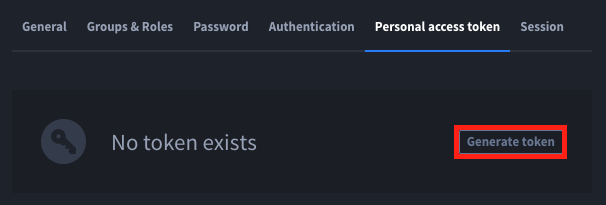
![Turbine Cloud Personal Access Token](https://www.elastic.co/docs/reference/integrations/images/swimlane/turbine-cloud-pat.png "Turbine Cloud Personal Access Token")
Configure the settings page with your Turbine Cloud URL, Account Id, and Private Token
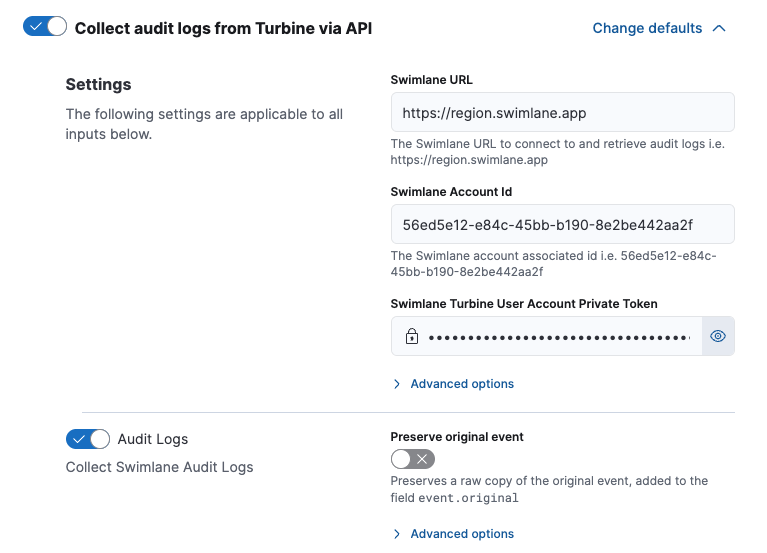
![Turbine Cloud Settings](https://www.elastic.co/docs/reference/integrations/images/swimlane/turbine-cloud-settings.png "Turbine Cloud Settings")

### For Turbie Platform Installs (TPI)

TPI settings can be configured in the administrator dashboard as seen below:
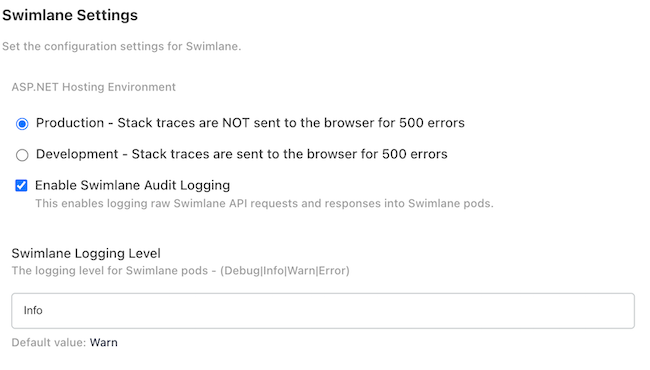
![TPI Audit Log Settings](https://www.elastic.co/docs/reference/integrations/images/swimlane/tpi-audit-log-settings.png "TPI Audit Log Settings")

### For Helm or Kustomize Installs

The following environment variables will need to be set for Audit logs to be outputted into the container pod logs.
```
swimlane-api & swimlane-tenant:
	"SWIMLANE_Logging__Level=Info"
	"SWIMLANE_Logging__IncludeAudit=true"

turbine-api:
	"LOG_LEVEL_API=info"
	"LOG_LEVEL_DEFAULT=info"
	"LOG_LEVEL_SYSTEM=info"
	"LOG_FILES_ENABLED=false"
```


## Data Stream


### swimlane.audit_logs

<dropdown title="Example">
  ```json
  {
      "@timestamp": "2025-04-23T22:17:40.362Z",
      "agent": {
          "ephemeral_id": "746054e4-580b-44ed-b43f-4fb8f9ba0051",
          "id": "56fec57e-c0fe-4035-89f2-3242af12350a",
          "name": "elastic-agent-10047",
          "type": "filebeat",
          "version": "8.17.4"
      },
      "cloud": {
          "origin": {
              "account": {
                  "id": "01966444-24d9-7a76-b517-3699a780b068"
              },
              "project": {
                  "id": "0196648c-68b6-78f0-9f56-e0eea2faa288"
              }
          }
      },
      "data_stream": {
          "dataset": "swimlane.audit_logs",
          "namespace": "22282",
          "type": "logs"
      },
      "ecs": {
          "version": "8.0.0"
      },
      "elastic_agent": {
          "id": "56fec57e-c0fe-4035-89f2-3242af12350a",
          "snapshot": false,
          "version": "8.17.4"
      },
      "event": {
          "agent_id_status": "verified",
          "dataset": "swimlane.audit_logs",
          "ingested": "2025-07-15T05:24:45Z",
          "kind": "event",
          "original": "{\"$type\":\"Core.Models.ElasticAudit.AuditLogSchema, Core\",\"accountId\":\"01966444-24d9-7a76-b517-3699a780b068\",\"actionType\":\"Update\",\"authenticationType\":\"JWT\",\"category\":\"Record\",\"description\":\"admin@domain.tld updated report 68095b8dce404ef1b500f7e8\",\"endpoint\":\"/app/a8FJwIi_XeE5big7m\",\"eventOutcome\":\"Success\",\"eventTime\":\"2025-04-23T22:17:40.362641Z\",\"id\":\"68095b8dce404ef1b500f7e8\",\"isAdmin\":true,\"newValue\":\"{\\\"GroupBys\\\":[],\\\"Aggregates\\\":[],\\\"ApplicationIds\\\":[\\\"a8FJwIi_XeE5big7m\\\"],\\\"Keywords\\\":null,\\\"Columns\\\":[\\\"68095b8dce404ef1b500f7e6\\\"],\\\"Sorts\\\":{\\\"68095b8dce404ef1b500f7e6\\\":1},\\\"Filters\\\":[],\\\"CountByApplicationFacet\\\":false,\\\"PageSize\\\":10,\\\"Offset\\\":0,\\\"DefaultSearchReport\\\":true,\\\"Allowed\\\":[],\\\"Permissions\\\":{},\\\"CreatedDate\\\":\\\"2025-04-23T21:28:45.686Z\\\",\\\"ModifiedDate\\\":\\\"2025-04-23T22:17:40.3466444Z\\\",\\\"CreatedByUser\\\":{\\\"Id\\\":\\\"01966448-16a7-7474-9f83-40b1dd9a2fb2\\\",\\\"Name\\\":\\\"admin@swimlane.com\\\"},\\\"ModifiedByUser\\\":{\\\"Id\\\":\\\"01966448-16a7-7474-9f83-40b1dd9a2fb2\\\",\\\"Name\\\":\\\"admin@swimlane.com\\\"},\\\"ChartOptions\\\":null,\\\"StatsDrillin\\\":null,\\\"FilterType\\\":\\\"And\\\",\\\"ColorCoding\\\":[],\\\"Uid\\\":\\\"default-6bbd7\\\",\\\"Version\\\":4,\\\"Id\\\":\\\"68095b8dce404ef1b500f7e8\\\",\\\"Name\\\":\\\"Default\\\",\\\"Disabled\\\":false}\",\"sourceIp\":[\"81.2.69.144\"],\"tenantId\":\"0196648c-68b6-78f0-9f56-e0eea2faa288\",\"user\":\"admin@domain.tld\",\"userAgent\":\"Mozilla/5.0 (Macintosh; Intel Mac OS X 10_15_7) AppleWebKit/537.36 (KHTML, like Gecko) Chrome/135.0.0.0 Safari/537.36\",\"userId\":\"01966448-16a7-7474-9f83-40b1dd9a2fb2\"}",
          "outcome": "success",
          "type": [
              "info"
          ]
      },
      "log": {
          "category": "Record"
      },
      "message": "admin@domain.tld updated report 68095b8dce404ef1b500f7e8",
      "related": {
          "user": [
              "admin@domain.tld"
          ]
      },
      "source": {
          "geo": {
              "city_name": "London",
              "continent_name": "Europe",
              "country_iso_code": "GB",
              "country_name": "United Kingdom",
              "location": {
                  "lat": 51.5142,
                  "lon": -0.0931
              },
              "region_iso_code": "GB-ENG",
              "region_name": "England"
          },
          "ip": "81.2.69.144"
      },
      "tags": [
          "preserve_original_event",
          "forwarded"
      ],
      "url": {
          "path": "/app/a8FJwIi_XeE5big7m"
      },
      "user": {
          "authentication": {
              "type": "jwt"
          },
          "id": "01966448-16a7-7474-9f83-40b1dd9a2fb2",
          "name": "admin@domain.tld"
      },
      "user_agent": {
          "device": {
              "name": "Mac"
          },
          "name": "Chrome",
          "original": "Mozilla/5.0 (Macintosh; Intel Mac OS X 10_15_7) AppleWebKit/537.36 (KHTML, like Gecko) Chrome/135.0.0.0 Safari/537.36",
          "os": {
              "full": "Mac OS X 10.15.7",
              "name": "Mac OS X",
              "version": "10.15.7"
          },
          "version": "135.0.0.0"
      }
  }
  ```
</dropdown>

<dropdown title="Exported fields">
  | Field                           | Description                                                                                                                                                                                                                                                                                                                                                                                                                                                                                                                  | Type             |
  |---------------------------------|------------------------------------------------------------------------------------------------------------------------------------------------------------------------------------------------------------------------------------------------------------------------------------------------------------------------------------------------------------------------------------------------------------------------------------------------------------------------------------------------------------------------------|------------------|
  | @timestamp                      | Date/time when the event originated. This is the date/time extracted from the event, typically representing when the event was generated by the source. If the event source has no original timestamp, this value is typically populated by the first time the event was received by the pipeline. Required field for all events.                                                                                                                                                                                            | date             |
  | cloud.account.origin.account.id | Cloud Account Id                                                                                                                                                                                                                                                                                                                                                                                                                                                                                                             | keyword          |
  | cloud.account.origin.project.id | Cloud Account Project Id                                                                                                                                                                                                                                                                                                                                                                                                                                                                                                     | keyword          |
  | data_stream.dataset             | The field can contain anything that makes sense to signify the source of the data. Examples include `nginx.access`, `prometheus`, `endpoint` etc. For data streams that otherwise fit, but that do not have dataset set we use the value "generic" for the dataset value. `event.dataset` should have the same value as `data_stream.dataset`. Beyond the Elasticsearch data stream naming criteria noted above, the `dataset` value has additional restrictions:   * Must not contain `-`   * No longer than 100 characters | constant_keyword |
  | data_stream.namespace           | A user defined namespace. Namespaces are useful to allow grouping of data. Many users already organize their indices this way, and the data stream naming scheme now provides this best practice as a default. Many users will populate this field with `default`. If no value is used, it falls back to `default`. Beyond the Elasticsearch index naming criteria noted above, `namespace` value has the additional restrictions:   * Must not contain `-`   * No longer than 100 characters                                | constant_keyword |
  | data_stream.type                | An overarching type for the data stream. Currently allowed values are "logs" and "metrics". We expect to also add "traces" and "synthetics" in the near future.                                                                                                                                                                                                                                                                                                                                                              | constant_keyword |
  | destination.user.changes.id     | Unique identifier of the user which was modified                                                                                                                                                                                                                                                                                                                                                                                                                                                                             | keyword          |
  | destination.user.changes.name   | Name of the user which was modified                                                                                                                                                                                                                                                                                                                                                                                                                                                                                          | keyword          |
  | log.category                    | Log Category                                                                                                                                                                                                                                                                                                                                                                                                                                                                                                                 | keyword          |
  | log.feature_category            | Log Feature Category                                                                                                                                                                                                                                                                                                                                                                                                                                                                                                         | keyword          |
  | log.source.type                 | Log Source                                                                                                                                                                                                                                                                                                                                                                                                                                                                                                                   | keyword          |
  | log.type                        | Log Type                                                                                                                                                                                                                                                                                                                                                                                                                                                                                                                     | keyword          |
  | source.user.changes.id          | Unique identifier of the user which made the modification                                                                                                                                                                                                                                                                                                                                                                                                                                                                    | keyword          |
  | user.authentication.type        | The authentication type used by the user for this request                                                                                                                                                                                                                                                                                                                                                                                                                                                                    | keyword          |
  | user_agent.original             | Unparsed user_agent string.                                                                                                                                                                                                                                                                                                                                                                                                                                                                                                  | keyword          |
  | user_agent.original.text        | Multi-field of `user_agent.original`.                                                                                                                                                                                                                                                                                                                                                                                                                                                                                        | match_only_text  |
</dropdown>


### swimlane.api

<dropdown title="Example">
  ```json
  {
      "@timestamp": "2025-04-10T19:26:36.081Z",
      "agent": {
          "ephemeral_id": "5814bbee-5352-4992-8532-0beb51e09fe5",
          "id": "69d7d16c-ed6a-4ec8-85d7-9a58c6b644e8",
          "name": "elastic-agent-97098",
          "type": "filebeat",
          "version": "8.17.4"
      },
      "cloud": {
          "origin": {
              "account": {
                  "id": "5fbee706-0909-4t1a-ada7-3e8e2a1f3117"
              },
              "project": {
                  "id": "5941becf-5ac4-493e-97eb-50da36f80582"
              }
          }
      },
      "data_stream": {
          "dataset": "swimlane.api",
          "namespace": "95416",
          "type": "logs"
      },
      "ecs": {
          "version": "8.17.0"
      },
      "elastic_agent": {
          "id": "69d7d16c-ed6a-4ec8-85d7-9a58c6b644e8",
          "snapshot": false,
          "version": "8.17.4"
      },
      "event": {
          "agent_id_status": "verified",
          "dataset": "swimlane.api",
          "ingested": "2025-07-15T05:25:42Z",
          "kind": "event",
          "outcome": "success",
          "type": [
              "creation"
          ]
      },
      "host": {
          "architecture": "x86_64",
          "containerized": false,
          "hostname": "elastic-agent-97098",
          "ip": [
              "172.19.0.2",
              "172.18.0.4"
          ],
          "mac": [
              "BE-04-BE-91-B9-23",
              "FA-33-80-61-9E-D2"
          ],
          "name": "elastic-agent-97098",
          "os": {
              "family": "",
              "kernel": "6.10.14-linuxkit",
              "name": "Wolfi",
              "platform": "wolfi",
              "type": "linux",
              "version": "20230201"
          }
      },
      "log": {
          "category": "Settings",
          "source": {
              "type": "api"
          },
          "type": "Audit"
      },
      "message": "admin@domain.tld created a new permission",
      "related": {
          "user": [
              "admin",
              "admin@domain.tld"
          ]
      },
      "source": {
          "geo": {
              "city_name": "London",
              "continent_name": "Europe",
              "country_iso_code": "GB",
              "country_name": "United Kingdom",
              "location": {
                  "lat": 51.5142,
                  "lon": -0.0931
              },
              "region_iso_code": "GB-ENG",
              "region_name": "England"
          },
          "ip": "81.2.69.144"
      },
      "url": {
          "path": "/app/aK_JIlwxET4gA7RWN"
      },
      "user": {
          "authentication": {
              "type": "jwt"
          },
          "domain": "domain.tld",
          "email": "admin@domain.tld",
          "id": "1af3bd48-d46e-490f-c015-004d198d0558",
          "name": "admin"
      },
      "user_agent": {
          "device": {
              "name": "Mac"
          },
          "name": "Chrome",
          "original": "Mozilla/5.0 (Macintosh; Intel Mac OS X 10_15_7) AppleWebKit/537.36 (KHTML, like Gecko) Chrome/135.0.0.0 Safari/537.36",
          "os": {
              "full": "Mac OS X 10.15.7",
              "name": "Mac OS X",
              "version": "10.15.7"
          },
          "version": "135.0.0.0"
      }
  }
  ```
</dropdown>

<dropdown title="Exported fields">
  | Field                           | Description                                                                                                                                                                                                                                                                                                                                                                                                                                                                                                                  | Type             |
  |---------------------------------|------------------------------------------------------------------------------------------------------------------------------------------------------------------------------------------------------------------------------------------------------------------------------------------------------------------------------------------------------------------------------------------------------------------------------------------------------------------------------------------------------------------------------|------------------|
  | @timestamp                      | Date/time when the event originated. This is the date/time extracted from the event, typically representing when the event was generated by the source. If the event source has no original timestamp, this value is typically populated by the first time the event was received by the pipeline. Required field for all events.                                                                                                                                                                                            | date             |
  | cloud.account.origin.project.id | Cloud Account Project Id                                                                                                                                                                                                                                                                                                                                                                                                                                                                                                     | keyword          |
  | data_stream.dataset             | The field can contain anything that makes sense to signify the source of the data. Examples include `nginx.access`, `prometheus`, `endpoint` etc. For data streams that otherwise fit, but that do not have dataset set we use the value "generic" for the dataset value. `event.dataset` should have the same value as `data_stream.dataset`. Beyond the Elasticsearch data stream naming criteria noted above, the `dataset` value has additional restrictions:   * Must not contain `-`   * No longer than 100 characters | constant_keyword |
  | data_stream.namespace           | A user defined namespace. Namespaces are useful to allow grouping of data. Many users already organize their indices this way, and the data stream naming scheme now provides this best practice as a default. Many users will populate this field with `default`. If no value is used, it falls back to `default`. Beyond the Elasticsearch index naming criteria noted above, `namespace` value has the additional restrictions:   * Must not contain `-`   * No longer than 100 characters                                | constant_keyword |
  | data_stream.type                | An overarching type for the data stream. Currently allowed values are "logs" and "metrics". We expect to also add "traces" and "synthetics" in the near future.                                                                                                                                                                                                                                                                                                                                                              | constant_keyword |
  | destination.user.changes.id     | Unique identifier of the user which was modified                                                                                                                                                                                                                                                                                                                                                                                                                                                                             | keyword          |
  | destination.user.changes.name   | Name of the user which was modified                                                                                                                                                                                                                                                                                                                                                                                                                                                                                          | keyword          |
  | log.category                    | Log Category                                                                                                                                                                                                                                                                                                                                                                                                                                                                                                                 | keyword          |
  | log.feature_category            | Log Feature Category                                                                                                                                                                                                                                                                                                                                                                                                                                                                                                         | keyword          |
  | log.source.type                 | Log Source                                                                                                                                                                                                                                                                                                                                                                                                                                                                                                                   | keyword          |
  | log.type                        | Log Type                                                                                                                                                                                                                                                                                                                                                                                                                                                                                                                     | keyword          |
  | source.user.changes.id          | Unique identifier of the user which made the modification                                                                                                                                                                                                                                                                                                                                                                                                                                                                    | keyword          |
  | user.authentication.type        | The authentication type used by the user for this request                                                                                                                                                                                                                                                                                                                                                                                                                                                                    | keyword          |
  | user_agent.original             | Unparsed user_agent string.                                                                                                                                                                                                                                                                                                                                                                                                                                                                                                  | keyword          |
  | user_agent.original.text        | Multi-field of `user_agent.original`.                                                                                                                                                                                                                                                                                                                                                                                                                                                                                        | match_only_text  |
</dropdown>


### swimlane.tenant

<dropdown title="Example">
  ```json
  {
      "@timestamp": "2025-04-09T22:09:49.893Z",
      "agent": {
          "ephemeral_id": "3fe09c78-b6dd-475e-b016-10f9a9de6bea",
          "id": "563da48e-31cc-43c2-8202-4a3817d48e83",
          "name": "elastic-agent-95513",
          "type": "filebeat",
          "version": "8.17.4"
      },
      "data_stream": {
          "dataset": "swimlane.tenant",
          "namespace": "76420",
          "type": "logs"
      },
      "ecs": {
          "version": "8.17.0"
      },
      "elastic_agent": {
          "id": "563da48e-31cc-43c2-8202-4a3817d48e83",
          "snapshot": false,
          "version": "8.17.4"
      },
      "event": {
          "agent_id_status": "verified",
          "dataset": "swimlane.tenant",
          "ingested": "2025-07-15T05:26:33Z",
          "kind": "event",
          "outcome": "failure",
          "type": [
              "start"
          ]
      },
      "host": {
          "architecture": "x86_64",
          "containerized": false,
          "hostname": "elastic-agent-95513",
          "ip": [
              "172.19.0.2",
              "172.18.0.4"
          ],
          "mac": [
              "56-B1-32-0A-8E-63",
              "5A-39-ED-C8-CE-DC"
          ],
          "name": "elastic-agent-95513",
          "os": {
              "family": "",
              "kernel": "6.10.14-linuxkit",
              "name": "Wolfi",
              "platform": "wolfi",
              "type": "linux",
              "version": "20230201"
          }
      },
      "log": {
          "category": "Login",
          "level": "INFO",
          "source": {
              "type": "Tenant Service"
          },
          "type": "Audit"
      },
      "message": "Failed login attempt registered for the swimlane user admin@domain.tld, current failed login attempts:1",
      "related": {
          "user": [
              "admin",
              "admin@domain.tld"
          ]
      },
      "source": {
          "geo": {
              "city_name": "London",
              "continent_name": "Europe",
              "country_iso_code": "GB",
              "country_name": "United Kingdom",
              "location": {
                  "lat": 51.5142,
                  "lon": -0.0931
              },
              "region_iso_code": "GB-ENG",
              "region_name": "England"
          },
          "ip": "81.2.69.144"
      },
      "url": {
          "domain": "turbine.domain.tld",
          "path": "api/users/login"
      },
      "user": {
          "domain": "domain.tld",
          "email": "admin@domain.tld",
          "id": "1af3bd48-d46e-490f-c015-004d198d0558",
          "name": "admin"
      },
      "user_agent": {
          "device": {
              "name": "Mac"
          },
          "name": "Chrome",
          "original": "Mozilla/5.0 (Macintosh; Intel Mac OS X 10_15_7) AppleWebKit/537.36 (KHTML, like Gecko) Chrome/135.0.0.0 Safari/537.36",
          "os": {
              "full": "Mac OS X 10.15.7",
              "name": "Mac OS X",
              "version": "10.15.7"
          },
          "version": "135.0.0.0"
      }
  }
  ```
</dropdown>

<dropdown title="Exported fields">
  | Field                           | Description                                                                                                                                                                                                                                                                                                                                                                                                                                                                                                                  | Type             |
  |---------------------------------|------------------------------------------------------------------------------------------------------------------------------------------------------------------------------------------------------------------------------------------------------------------------------------------------------------------------------------------------------------------------------------------------------------------------------------------------------------------------------------------------------------------------------|------------------|
  | @timestamp                      | Date/time when the event originated. This is the date/time extracted from the event, typically representing when the event was generated by the source. If the event source has no original timestamp, this value is typically populated by the first time the event was received by the pipeline. Required field for all events.                                                                                                                                                                                            | date             |
  | cloud.account.origin.account.id | Cloud Account Id                                                                                                                                                                                                                                                                                                                                                                                                                                                                                                             | keyword          |
  | cloud.account.origin.project.id | Cloud Account Project Id                                                                                                                                                                                                                                                                                                                                                                                                                                                                                                     | keyword          |
  | data_stream.dataset             | The field can contain anything that makes sense to signify the source of the data. Examples include `nginx.access`, `prometheus`, `endpoint` etc. For data streams that otherwise fit, but that do not have dataset set we use the value "generic" for the dataset value. `event.dataset` should have the same value as `data_stream.dataset`. Beyond the Elasticsearch data stream naming criteria noted above, the `dataset` value has additional restrictions:   * Must not contain `-`   * No longer than 100 characters | constant_keyword |
  | data_stream.namespace           | A user defined namespace. Namespaces are useful to allow grouping of data. Many users already organize their indices this way, and the data stream naming scheme now provides this best practice as a default. Many users will populate this field with `default`. If no value is used, it falls back to `default`. Beyond the Elasticsearch index naming criteria noted above, `namespace` value has the additional restrictions:   * Must not contain `-`   * No longer than 100 characters                                | constant_keyword |
  | data_stream.type                | An overarching type for the data stream. Currently allowed values are "logs" and "metrics". We expect to also add "traces" and "synthetics" in the near future.                                                                                                                                                                                                                                                                                                                                                              | constant_keyword |
  | destination.user.changes.id     | Unique identifier of the user which was modified                                                                                                                                                                                                                                                                                                                                                                                                                                                                             | keyword          |
  | destination.user.changes.name   | Name of the user which was modified                                                                                                                                                                                                                                                                                                                                                                                                                                                                                          | keyword          |
  | log.category                    | Log Category                                                                                                                                                                                                                                                                                                                                                                                                                                                                                                                 | keyword          |
  | log.feature_category            | Log Feature Category                                                                                                                                                                                                                                                                                                                                                                                                                                                                                                         | keyword          |
  | log.source.type                 | Log Source                                                                                                                                                                                                                                                                                                                                                                                                                                                                                                                   | keyword          |
  | log.type                        | Log Type                                                                                                                                                                                                                                                                                                                                                                                                                                                                                                                     | keyword          |
  | source.user.changes.id          | Unique identifier of the user which made the modification                                                                                                                                                                                                                                                                                                                                                                                                                                                                    | keyword          |
  | user.authentication.type        | The authentication type used by the user for this request                                                                                                                                                                                                                                                                                                                                                                                                                                                                    | keyword          |
  | user_agent.original             | Unparsed user_agent string.                                                                                                                                                                                                                                                                                                                                                                                                                                                                                                  | keyword          |
  | user_agent.original.text        | Multi-field of `user_agent.original`.                                                                                                                                                                                                                                                                                                                                                                                                                                                                                        | match_only_text  |
  | .                               |                                                                                                                                                                                                                                                                                                                                                                                                                                                                                                                              |                  |
</dropdown>


### turbine.api

<dropdown title="Example">
  ```json
  {
      "@timestamp": "2025-04-10T20:32:26.677Z",
      "agent": {
          "ephemeral_id": "3576ff0a-b7df-43af-9bd8-a5bf57bc2cf2",
          "id": "ed5d0a88-05fc-4039-8d6d-3a8b3ca1290c",
          "name": "elastic-agent-27143",
          "type": "filebeat",
          "version": "8.17.4"
      },
      "cloud": {
          "origin": {
              "account": {
                  "id": "5fbee706-0909-4f1a-ada7-3e8e2a1f3117"
              },
              "project": {
                  "id": "5941becf-5ac4-493e-97eb-50da36e80582"
              }
          }
      },
      "data_stream": {
          "dataset": "turbine.api",
          "namespace": "50763",
          "type": "logs"
      },
      "ecs": {
          "version": "8.17.0"
      },
      "elastic_agent": {
          "id": "ed5d0a88-05fc-4039-8d6d-3a8b3ca1290c",
          "snapshot": false,
          "version": "8.17.4"
      },
      "event": {
          "agent_id_status": "verified",
          "dataset": "turbine.api",
          "ingested": "2025-07-15T05:27:22Z",
          "kind": "event",
          "outcome": "success",
          "type": [
              "creation"
          ]
      },
      "host": {
          "architecture": "x86_64",
          "containerized": false,
          "hostname": "elastic-agent-27143",
          "ip": [
              "172.19.0.2",
              "172.18.0.4"
          ],
          "mac": [
              "2A-47-79-C2-78-65",
              "9A-4A-F1-87-EA-4B"
          ],
          "name": "elastic-agent-27143",
          "os": {
              "family": "",
              "kernel": "6.10.14-linuxkit",
              "name": "Wolfi",
              "platform": "wolfi",
              "type": "linux",
              "version": "20230201"
          }
      },
      "log": {
          "category": "Asset",
          "type": "Audit"
      },
      "message": "admin@domain.tld Created asset 67f82ada9deafb2d6ec46987: ECK with Id: 67f82ada9deafb2d6ec46987",
      "related": {
          "user": [
              "admin",
              "admin@domain.tld"
          ]
      },
      "source": {
          "geo": {
              "city_name": "London",
              "continent_name": "Europe",
              "country_iso_code": "GB",
              "country_name": "United Kingdom",
              "location": {
                  "lat": 51.5142,
                  "lon": -0.0931
              },
              "region_iso_code": "GB-ENG",
              "region_name": "England"
          },
          "ip": "81.2.69.144"
      },
      "url": {
          "path": "/v1/asset"
      },
      "user": {
          "authentication": {
              "type": "jwt"
          },
          "domain": "domain.tld",
          "email": "admin@domain.tld",
          "id": "1af3bd48-d46e-490f-b015-004c198d0558",
          "name": "admin"
      },
      "user_agent": {
          "device": {
              "name": "Mac"
          },
          "name": "Chrome",
          "original": "Mozilla/5.0 (Macintosh; Intel Mac OS X 10_15_7) AppleWebKit/537.36 (KHTML, like Gecko) Chrome/135.0.0.0 Safari/537.36",
          "os": {
              "full": "Mac OS X 10.15.7",
              "name": "Mac OS X",
              "version": "10.15.7"
          },
          "version": "135.0.0.0"
      }
  }
  ```
</dropdown>

<dropdown title="Exported fields">
  | Field                           | Description                                                                                                                                                                                                                                                                                                                                                                                                                                                                                                                  | Type             |
  |---------------------------------|------------------------------------------------------------------------------------------------------------------------------------------------------------------------------------------------------------------------------------------------------------------------------------------------------------------------------------------------------------------------------------------------------------------------------------------------------------------------------------------------------------------------------|------------------|
  | @timestamp                      | Date/time when the event originated. This is the date/time extracted from the event, typically representing when the event was generated by the source. If the event source has no original timestamp, this value is typically populated by the first time the event was received by the pipeline. Required field for all events.                                                                                                                                                                                            | date             |
  | cloud.account.origin.account.id | Cloud Account Id                                                                                                                                                                                                                                                                                                                                                                                                                                                                                                             | keyword          |
  | cloud.account.origin.project.id | Cloud Account Project Id                                                                                                                                                                                                                                                                                                                                                                                                                                                                                                     | keyword          |
  | data_stream.dataset             | The field can contain anything that makes sense to signify the source of the data. Examples include `nginx.access`, `prometheus`, `endpoint` etc. For data streams that otherwise fit, but that do not have dataset set we use the value "generic" for the dataset value. `event.dataset` should have the same value as `data_stream.dataset`. Beyond the Elasticsearch data stream naming criteria noted above, the `dataset` value has additional restrictions:   * Must not contain `-`   * No longer than 100 characters | constant_keyword |
  | data_stream.namespace           | A user defined namespace. Namespaces are useful to allow grouping of data. Many users already organize their indices this way, and the data stream naming scheme now provides this best practice as a default. Many users will populate this field with `default`. If no value is used, it falls back to `default`. Beyond the Elasticsearch index naming criteria noted above, `namespace` value has the additional restrictions:   * Must not contain `-`   * No longer than 100 characters                                | constant_keyword |
  | data_stream.type                | An overarching type for the data stream. Currently allowed values are "logs" and "metrics". We expect to also add "traces" and "synthetics" in the near future.                                                                                                                                                                                                                                                                                                                                                              | constant_keyword |
  | destination.user.changes.id     | Unique identifier of the user which was modified                                                                                                                                                                                                                                                                                                                                                                                                                                                                             | keyword          |
  | destination.user.changes.name   | Name of the user which was modified                                                                                                                                                                                                                                                                                                                                                                                                                                                                                          | keyword          |
  | log.category                    | Log Category                                                                                                                                                                                                                                                                                                                                                                                                                                                                                                                 | keyword          |
  | log.feature_category            | Log Feature Category                                                                                                                                                                                                                                                                                                                                                                                                                                                                                                         | keyword          |
  | log.source.type                 | Log Source                                                                                                                                                                                                                                                                                                                                                                                                                                                                                                                   | keyword          |
  | log.type                        | Log Type                                                                                                                                                                                                                                                                                                                                                                                                                                                                                                                     | keyword          |
  | source.user.changes.id          | Unique identifier of the user which made the modification                                                                                                                                                                                                                                                                                                                                                                                                                                                                    | keyword          |
  | user.authentication.type        | The authentication type used by the user for this request                                                                                                                                                                                                                                                                                                                                                                                                                                                                    | keyword          |
  | user_agent.original             | Unparsed user_agent string.                                                                                                                                                                                                                                                                                                                                                                                                                                                                                                  | keyword          |
  | user_agent.original.text        | Multi-field of `user_agent.original`.                                                                                                                                                                                                                                                                                                                                                                                                                                                                                        | match_only_text  |
</dropdown>


## Screenshots

This integration includes one or more Kibana dashboards that visualizes the data collected by the integration. The screenshots below illustrate how the ingested data is displayed.

<carousel>
  ![Sample screenshot](https://epr.elastic.co/package/swimlane/0.7.0/img/swimlane.png)
</carousel>


## Changelog

<dropdown title="Changelog">
  | Version   | Details                                                                                                                                                                                                                                                                                                                                                                                                       | Minimum Kibana version |
  |-----------|---------------------------------------------------------------------------------------------------------------------------------------------------------------------------------------------------------------------------------------------------------------------------------------------------------------------------------------------------------------------------------------------------------------|------------------------|
  | **0.7.0** | **Enhancement** ([View pull request](https://github.com/elastic/integrations/pull/20987))Update Elastic Managed integration documentation to the current wording and docs links.                                                                                                                                                                                                                              | 9.0.58.19.2            |
  | **0.6.0** | **Enhancement** ([View pull request](https://github.com/elastic/integrations/pull/20575))Add tags to ingest pipeline processors and add `preserve_original_event` to pipeline-level `on_failure` handlers.**Bug fix** ([View pull request](https://github.com/elastic/integrations/pull/20575))Remove a redundant no-op `rename` processor for `swimlane.audit_log.category` in the `audit_logs` data stream. | 9.0.58.19.2            |
  | **0.5.1** | **Enhancement** ([View pull request](https://github.com/elastic/integrations/pull/20463))Set agentless deployment mode `release` field to `ga`.                                                                                                                                                                                                                                                               | 9.0.58.19.2            |
  | **0.5.0** | **Enhancement** ([View pull request](https://github.com/elastic/integrations/pull/19479))Enable Agentless deployment.                                                                                                                                                                                                                                                                                         | 9.0.58.19.2            |
  | **0.4.2** | **Bug fix** ([View pull request](https://github.com/elastic/integrations/pull/17963))Add missing request trace enabled default option.                                                                                                                                                                                                                                                                        | 9.0.08.17.4            |
  | **0.4.1** | **Bug fix** ([View pull request](https://github.com/elastic/integrations/pull/14544))Fix type conflict with other integration using `log.source` and use ECS definitions where possible.                                                                                                                                                                                                                      | 9.0.08.17.4            |
  | **0.4.0** | **Enhancement** ([View pull request](https://github.com/elastic/integrations/pull/13972))Added support for log collection through API endpoint                                                                                                                                                                                                                                                                | 9.0.08.17.4            |
  | **0.3.0** | **Enhancement** ([View pull request](https://github.com/elastic/integrations/pull/14137))Standardize user fields processing across integrations.                                                                                                                                                                                                                                                              | 9.0.08.17.4            |
  | **0.2.0** | **Enhancement** ([View pull request](https://github.com/elastic/integrations/pull/14197))Update Kibana constraint to support 9.0.0.                                                                                                                                                                                                                                                                           | 9.0.08.17.4            |
  | **0.1.0** | **Enhancement** ([View pull request](https://github.com/elastic/integrations/pull/13499))Initial draft of the package.                                                                                                                                                                                                                                                                                        | 8.17.4                 |
</dropdown>