---
title: Data Exfiltration Detection
description: The Data Exfiltration Detection (DED) package contains assets for detecting data exfiltration in network and file data. Data Exfiltration Detection package...
url: https://www.elastic.co/docs/reference/integrations/ded
products:
- Elastic integrations
applies_to:
- Serverless Security projects: Generally available
- Elastic Stack: Generally available since 9.4
---
# Data Exfiltration Detection
| | |
|-------------------------------------------------------------------------------------------------|--------------------------------|
| **Version** | 3.4.1 ([View all](#changelog)) |
| **Subscription level**[What's this?](https://www.elastic.co/subscriptions) | Platinum |
| **Developed by**[What's this?](https://www.elastic.co/docs/reference/integrations/developed-by) | Elastic |
| **Minimum Kibana version(s)** | 9.4.0 |
The Data Exfiltration Detection (DED) package contains assets for detecting data exfiltration in network and file data. Data Exfiltration Detection package currently supports only unidirectional flows and does not yet accommodate bi-directional flows. This package requires a Platinum subscription. Please ensure that you have a Trial or Platinum level subscription installed on your cluster before proceeding. This package is licensed under [Elastic License 2.0](https://www.elastic.co/licensing/elastic-license).
This package leverages event logs. Prior to using this integration, you must have Elastic Endpoint via Elastic Defend, or have equivalent tools/endpoints set up. If using Elastic Defend, Elastic Defend should be installed through Elastic Agent and collecting data from hosts. See [Configure endpoint protection with Elastic Defend](https://www.elastic.co/docs/solutions/security/configure-elastic-defend) for more information. The transform only supports Linux and Windows. The **Anomaly Detection Jobs** section outlines platform support for each job.
In versions 2.1.1 and later, this package ignores data in cold and frozen data tiers to reduce heap memory usage, avoid running on outdated data, and to follow best practices.
The following blog provides additional context. For the most current installation instructions, always follow the steps in this guide.
- [Detect data exfiltration activity with Kibana’s new integration](https://www.elastic.co/blog/detect-data-exfiltration-activity-with-kibanas-new-integration)
## Installation
1. **Upgrading**: If upgrading from a version below v3.0.0, see the section v3.0.0 and beyond.
2. **Add the Integration Package**: Install the package via **Management > Integrations > Add Data Exfiltration Detection**. Configure the integration name and agent policy. Click Save and Continue. (Note that this integration does not rely on an agent, and can be assigned to a policy without an agent.)
3. **Install assets**: Install the assets by clicking **Settings > Install Data Exfiltration Detection assets**.
4. **Check the health of the transform**: The transform is scheduled to run every 30 minutes. This transform creates the index `ml_network_ded_ea-`. To check the health of the transform go to **Management > Stack Management > Data > Transforms** under `logs-ded.pivot_transform_ea-default-`. Follow the instructions under the header `Customize Data Exfiltration Detection Transform` below to adjust filters based on your environment's needs.
5. **Create a data view for anomaly detection jobs**: This package contains anomaly detection jobs that work on file events and network events respectively. See the *Anomaly Detection Jobs* section below for more details. The network jobs use a designated index (`ml_network_ded_ea.all`) populated by the transform installed above, which is already pre-assigned to those jobs. Before enabling the anomaly detection jobs, create a data view for the file index pattern.
6. **Add preconfigured anomaly detection jobs**: In **Stack Management -> Anomaly Detection Jobs**, you will see **Select data view or saved search**. Select the data view created in the previous step. Then under `Use preconfigured jobs` you will see **Data Exfiltration Detection**. If you do not see this card, events must be ingested from a source that matches the query specified in the [ded-ml file](https://github.com/elastic/integrations/blob/main/packages/ded/kibana/ml_module/ded-ml.json#L10), such as Elastic Defend. When you select the card, you will see pre-configured anomaly detection jobs that you can create depending on what makes the most sense for your environment. If you are using Elastic Defend to collect events, file events are in `logs-endpoint.events.file-*` and network events in `logs-endpoint.events.network-*`. If you are only collecting file or network events, select only the relevant jobs at this step.
7. **Data view configuration for Dashboards**: For the dashboard to work as expected, the following settings need to be configured in Kibana.
1. You have started the above anomaly detection jobs.
2. You have **read** access to `.ml-anomalies-shared` data stream/index or are assigned the `machine_learning_user` role. For more information on roles, please refer to [Built-in roles in Elastic](https://www.elastic.co/guide/en/elasticsearch/reference/current/built-in-roles.html). Please be aware that a user who has access to the underlying machine learning results indices can see the results of *all* jobs in *all* spaces. Be mindful of granting permissions if you use Kibana spaces to control which users can see which machine learning results. For more information on machine learning privileges, refer to [setup-privileges](https://www.elastic.co/guide/en/machine-learning/current/setup.html#setup-privileges).
3. After enabling the jobs, go to **Management > Stack Management > Kibana > Data Views**. Click on **Create data view** with the following settings:
- Name: `.ml-anomalies-shared`
- Index pattern : `.ml-anomalies-shared*`
- Select **Show Advanced settings** enable **Allow hidden and system indices**
- Custom data view ID: `.ml-anomalies-shared`
***Warning***: When creating the data views for the dashboards, ensure that the `Custom data view ID` is set to the value specified above and is not left empty. Omitting or misconfiguring this field may result in broken visualizations, as illustrated by the error message below.

### Enable detection rules
You can also enable detection rules to alert on Data Exfiltration activity in your environment, based on anomalies flagged by the above ML jobs. As of version 2.0.0 of this package, these rules are available as part of the Detection Engine, and can be found using the tag `Use Case: Data Exfiltration Detection`. See this [documentation](https://www.elastic.co/guide/en/security/current/prebuilt-rules-management.html#load-prebuilt-rules) for more information on importing and enabling the rules.

*In Security > Rules, filtering with the “Use Case: Data Exfiltration Detection” tag*
## Transform
To inspect the installed assets, you can navigate to **Stack Management > Data > Transforms**.
| Transform name | Purpose | Source index | Destination index | Alias | Supported Platform | Event Category |
|------------------------|---------------------------------------------|---------------------------------------------------------|-----------------------------|-----------------------|--------------------|----------------|
| ded.pivot_transform_ea | Collects network logs from your environment | `logs-endpoint.events.network-*,logs-network_traffic.*` | ml_network_ded_ea-[version] | ml_network_ded_ea.all | Linux, Windows | network |
**Source index patterns**: `logs-endpoint.events.network-*` holds network events collected by the [Elastic Defend](https://www.elastic.co/docs/reference/integrations/endpoint) integration, and `logs-network_traffic.*` holds network packet traffic collected by the [Network Packet Capture](https://www.elastic.co/docs/reference/integrations/network_traffic) integration.
The transform applies only to network data and does not currently support macOS network logs. If you use Network Packet Capture as a data source, enable **`monitor_processes`** in the integration policy so network events are enriched with process fields used by the transform and ML jobs. This setting is disabled by default. See [monitor_processes](https://www.elastic.co/docs/reference/integrations/network_traffic#monitor_processes) in the Network Packet Capture documentation.
When querying the destination index (`ml_network_ded_ea-`) for network logs, we advise using the alias for the destination index (`ml_network_ded_ea.all`). In the event that the underlying package is upgraded, the alias will aid in maintaining the previous findings.
## Customize Data Exfiltration Detection Transform
To customize filters in the Data Exfiltration Detection transform, follow the below steps. You can use these instructions to update basic settings or to update filters for fields such as `process.name`, `source.ip`, `destination.ip`, and others.
1. To update settings such as retention policy, frequency, or destination configuration, stop the transform, click **Edit** from the **Actions** bar, make the required changes, and start the transform again.

2. To update the query filters, go to **Stack Management > Data > Transforms > `logs-ded.pivot_transform_ea-default-`**.
3. Click on the **Actions** bar at the far right of the transform and select the **Clone** option.

4. In the new **Clone transform** window, go to the **Search filter** and update any field values you want to add or remove. Click on the **Apply changes** button on the right side to save these changes. **Note:** The image below shows an example of filtering a new `process.name` as `explorer.exe`. You can follow a similar example and update the field value list based on your environment to help reduce noise and potential false positives.

5. Scroll down and select the **Next** button at the bottom right. Under the **Transform details** section, enter a new **Transform ID** and **Destination index** of your choice, then click on the **Next** button.

6. Lastly, select the **Create and Start** option. Your updated transform will now start collecting data. **Note:** Do not forget to update your data view based on the new **Destination index** you have just created.

## Dashboard
After the data view for the dashboard is configured, the **Data Exfiltration Detection Dashboard** is available under **Analytics > Dashboard**. This dashboard gives an overview of anomalies triggered for the data exfiltration detection package.
### Anomaly Detection Jobs
| Job | Description | Supported Platform | Event Category |
|---------------------------------------------------------|--------------------------------------------------------------------------------------------------------------------|--------------------|----------------|
| ded_high_sent_bytes_destination_geo_country_iso_code_ea | Detects data exfiltration to an unusual geo-location (by country iso code). | Linux, Windows | network |
| ded_high_sent_bytes_destination_ip_ea | Detects data exfiltration to an unusual geo-location (by IP address). | Linux, Windows | network |
| ded_high_sent_bytes_destination_port_ea | Detects data exfiltration to an unusual destination port. | Linux, Windows | network |
| ded_high_sent_bytes_destination_region_name_ea | Detects data exfiltration to an unusual geo-location (by region name). | Linux, Windows | network |
| ded_high_bytes_written_to_external_device_ea | Detects data exfiltration activity by identifying high bytes written to an external device. | Windows | file |
| ded_rare_process_writing_to_external_device_ea | Detects data exfiltration activity by identifying a writing event started by a rare process to an external device. | Windows | file |
| ded_high_bytes_written_to_external_device_airdrop_ea | Detects data exfiltration activity by identifying high bytes written to an external device via Airdrop. | macOS | file |
## Customize ML jobs for Data Exfiltration Detection
To customize the datafeed query and other settings such as model memory limit, frequency, query delay, bucket span and influencers for the Data Exfiltration Detection ML jobs, follow the steps below.
1. To update the datafeed query, stop the datafeed and select **Edit job** from the Actions menu.

2. In the Edit job window, navigate to the **Datafeed** section and update the query filters. You can add or remove field values to help reduce noise and false positives based on your environment.

3. You may also update the model memory limit if your environment has high data volume or if the job requires additional resources. Go to the **Job details** section and update the **Model memory limit** and hit **Save**. For more information on resizing ML jobs, refer to the [documentation](https://www.elastic.co/docs/explore-analyze/machine-learning/anomaly-detection/anomaly-detection-scale#set-model-memory-limit).

4. In order to do more advanced changes to your job, clone the job by selecting **Clone job** from the **Actions** menu.

5. In the cloned job, you can update datafeed settings such as **Frequency** and **Query delay**, which help control how often data is analyzed and account for ingestion delays.

6. You can also modify the job configuration by adjusting the **Bucket span** and by adding or removing **Influencers** to improve anomaly attribution.

7. Finally, assign a new Job ID, and click on **Create job**, and start the datafeed to apply the updated settings.
## v3.0.0 and beyond
v3.0.0 of this package requires Elastic Stack version 9.4 or later. It introduces support for Entity Analytics (EA), adding new fields for proper entity resolution.
- This package installs new ML jobs which include `_ea` suffix in their names, as outlined below. New transforms and detection rules are also included.
- Previously installed ML jobs, transforms, and rules will continue to run, allowing time to transition to the new Entity Analytics assets.
- **Important**: We recommend installing the new ML jobs and transforms and verifying that they are properly set up, collecting data, and generating anomalies **before** deleting the old jobs and upgrading to the new version of the detection rules available in 9.4. The new detection rules reference ML job IDs with the `_ea` suffix and are not compatible with older versions of the jobs.
- The new Entity Analytics transforms write to separate destination indices postfixed with `_ea`. Create a new data view for the Entity Analytics anomaly detection jobs using the new destination indices/aliases listed below. Do not mix old and new transform destination indices in the same data view.
- New dashboards are available in this version with the suffix "(Entity Analytics)" in the title. If you are still running jobs or transforms from before this version, the original dashboards without the suffix remain available.
The new Entity Analytics ML job IDs are:
- `ded_high_sent_bytes_destination_geo_country_iso_code_ea`
- `ded_high_sent_bytes_destination_ip_ea`
- `ded_high_sent_bytes_destination_port_ea`
- `ded_high_sent_bytes_destination_region_name_ea`
- `ded_high_bytes_written_to_external_device_ea`
- `ded_rare_process_writing_to_external_device_ea`
- `ded_high_bytes_written_to_external_device_airdrop_ea`
The new Entity Analytics transforms are:
- `ded.pivot_transform_ea` → destination index: `ml_network_ded_ea-3.0.0`, alias: `ml_network_ded_ea.latest`, `ml_network_ded_ea.all`
After confirming the new Entity Analytics ML jobs and transforms are running correctly, you can remove the following deprecated assets that have been superseded by the new Entity Analytics versions (Elastic stack 9.4+):
- Delete old ML jobs: Navigate to **Stack Management -> Anomaly Detection Jobs** and delete the following jobs:
- `ded_high_sent_bytes_destination_geo_country_iso_code`
- `ded_high_sent_bytes_destination_ip`
- `ded_high_sent_bytes_destination_port`
- `ded_high_sent_bytes_destination_region_name`
- `ded_high_bytes_written_to_external_device`
- `ded_rare_process_writing_to_external_device`
- `ded_high_bytes_written_to_external_device_airdrop`
- Delete old transforms: Navigate to **Stack Management -> Data -> Transforms** and delete:
- `ded.pivot_transform`
## v2.0.0 and beyond
v2.0.0 of the package introduces breaking changes, namely deprecating detection rules from the package. To continue receiving updates to Data Exfiltration Detection, we recommend upgrading to v2.0.0 after doing the following:
- Delete existing ML jobs: Navigate to **Stack Management -> Anomaly Detection Jobs** and delete jobs corresponding to the following IDs:
- high-sent-bytes-destination-geo-country_iso_code
- high-sent-bytes-destination-ip
- high-sent-bytes-destination-port
- high-sent-bytes-destination-region_name
- high-bytes-written-to-external-device
- rare-process-writing-to-external-device
- high-bytes-written-to-external-device-airdrop
Depending on the version of the package you're using, you might also be able to search for the above jobs using the group `data_exfiltration`.
- Uninstall existing rules associated with this package: Navigate to **Security > Rules** and delete the following rules:
- Potential Data Exfiltration Activity to an Unusual ISO Code
- Potential Data Exfiltration Activity to an Unusual Region
- Potential Data Exfiltration Activity to an Unusual IP Address
- Potential Data Exfiltration Activity to an Unusual Destination Port
- Spike in Bytes Sent to an External Device
- Spike in Bytes Sent to an External Device via Airdrop
- Unusual Process Writing Data to an External Device
Depending on the version of the package you're using, you might also be able to search for the above rules using the tag `Data Exfiltration`.
- Upgrade the Data Exfiltration Detection package to v2.0.0 using the steps [here](https://www.elastic.co/guide/en/fleet/current/upgrade-integration.html)
- Install the new rules as described in the [Enable detection rules](#enable-detection-rules) section below.
## Licensing
Usage in production requires that you have a license key that permits use of machine learning features.
## Screenshots
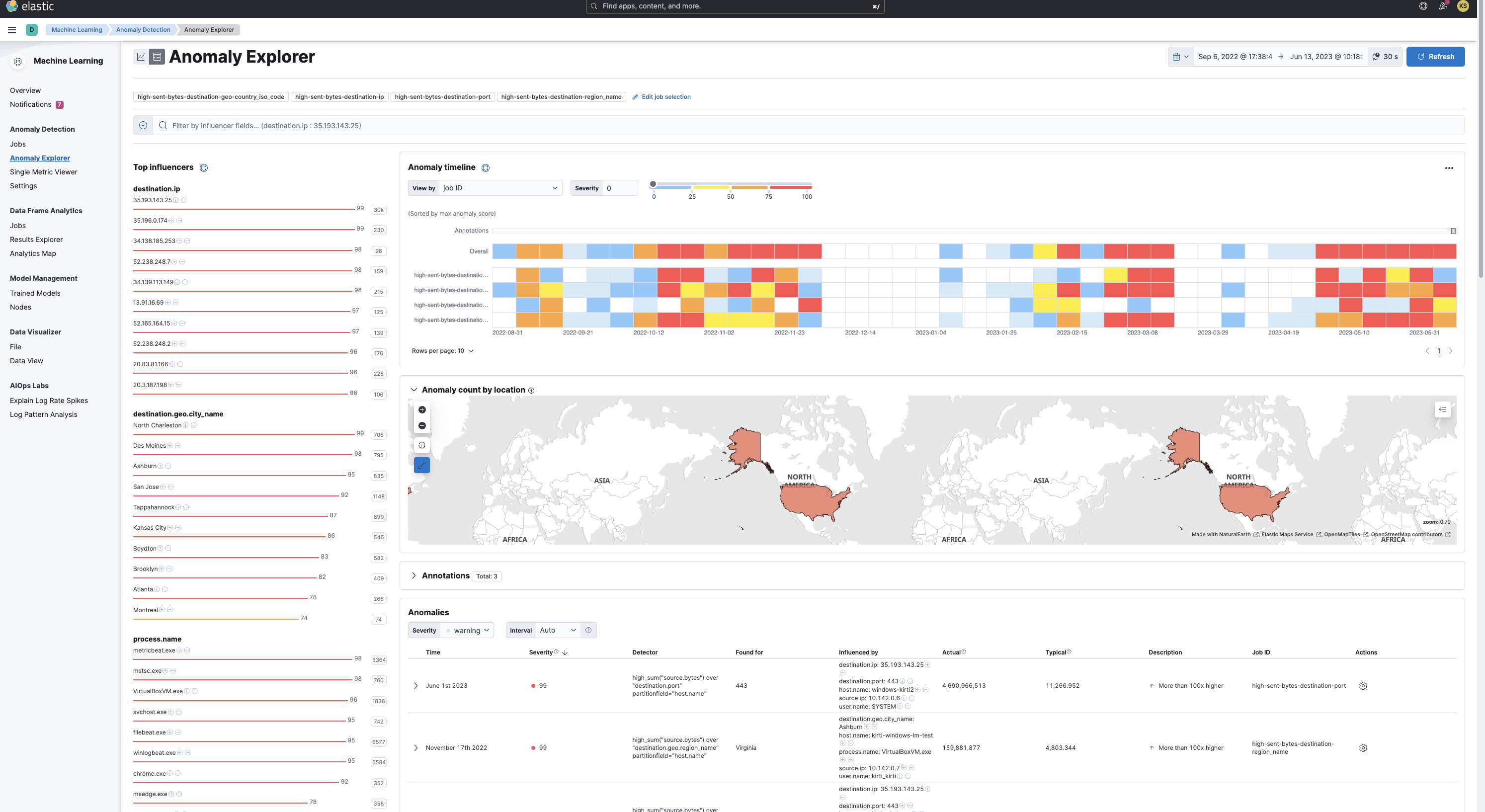
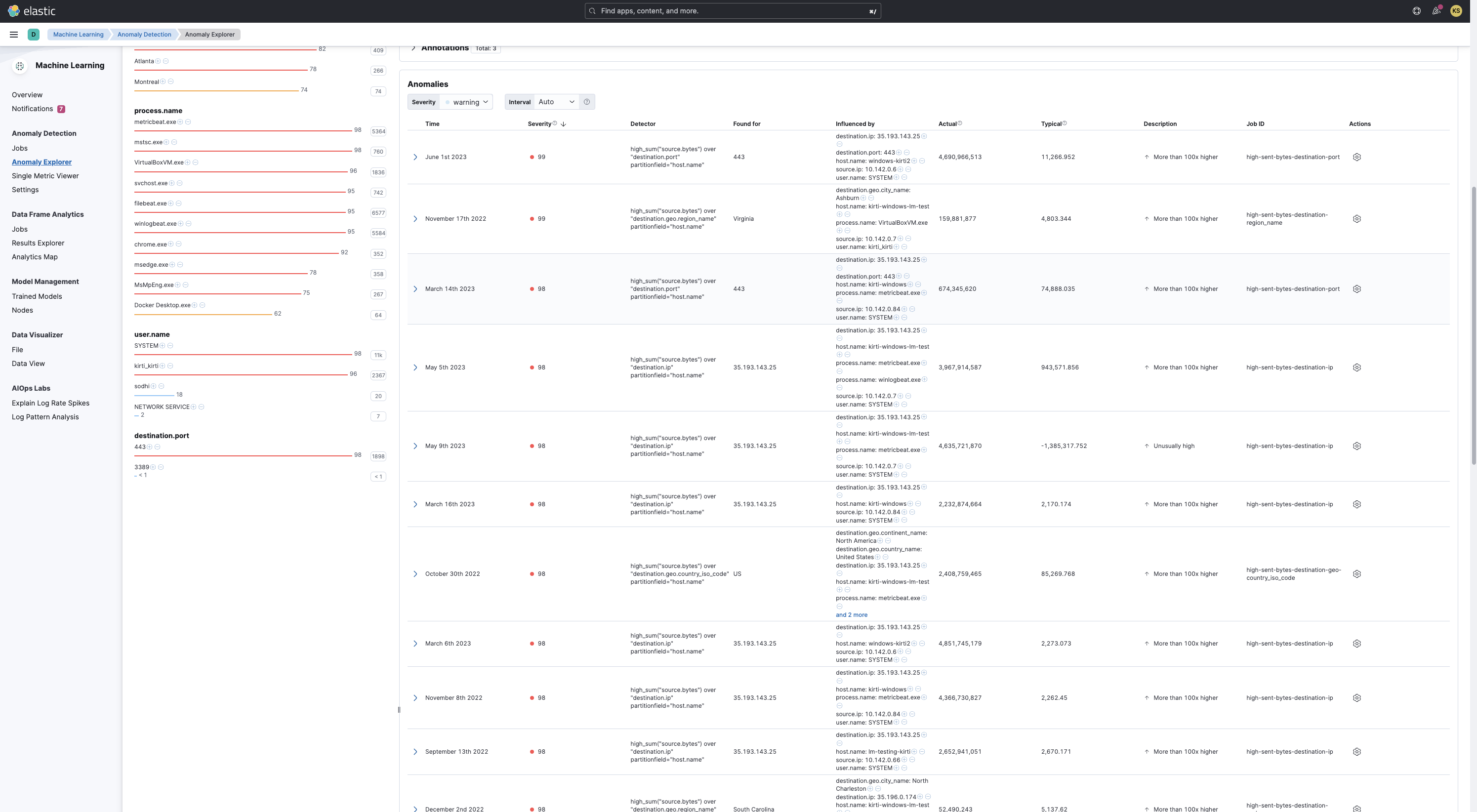
This integration includes one or more Kibana dashboards that visualizes the data collected by the integration. The screenshots below illustrate how the ingested data is displayed.
## Changelog
| Version | Details | Minimum Kibana version |
|-----------|-------------------------------------------------------------------------------------------------------------------------------------------------------------------------------------------------------------------------------|------------------------|
| **3.4.1** | **Enhancement** ([View pull request](https://github.com/elastic/integrations/pull/20662))Update package owner to threat-research-and-detection-engineering team. | 9.4.0 |
| **3.4.0** | **Enhancement** ([View pull request](https://github.com/elastic/integrations/pull/20335))Add file and process influencers to ML jobs and extend the network transform group_by with process and network fields. | 9.4.0 |
| **3.3.0** | **Enhancement** ([View pull request](https://github.com/elastic/integrations/pull/19998))Update transform source index to scope to the relevant data streams. | 9.4.0 |
| **3.2.0** | **Enhancement** ([View pull request](https://github.com/elastic/integrations/pull/19558))Add process signature fields as influencers to ML jobs and extend the network transform group_by with process.code_signature fields. | 9.4.0 |
| **3.1.1** | **Enhancement** ([View pull request](https://github.com/elastic/integrations/pull/19220))Add threat_tactics and threat_techniques to ML job custom_settings. | 9.4.0 |
| **3.1.0** | **Enhancement** ([View pull request](https://github.com/elastic/integrations/pull/18548))Update default index pattern for ML jobs to use the transform-generated index directly | 9.4.0 |
| **3.0.0** | **Enhancement** ([View pull request](https://github.com/elastic/integrations/pull/17626))Adds new fields for entity resolution with Entity Analytics in Elastic Stack 9.4. Includes new ML jobs, transforms, and dashboards. | 9.4.0 |
| **2.4.2** | **Bug fix** ([View pull request](https://github.com/elastic/integrations/pull/17933))Update documentation for blogs/data views | 9.0.08.10.1 |
| **2.4.1** | **Enhancement** ([View pull request](https://github.com/elastic/integrations/pull/17039))Update package docs with customization steps for ML jobs and transforms | 9.0.08.10.1 |
| **2.4.0** | **Bug fix** ([View pull request](https://github.com/elastic/integrations/pull/16995))Add a transform filter to exclude cold and frozen tier data | 9.0.08.10.1 |
| **2.3.5** | **Enhancement** ([View pull request](https://github.com/elastic/integrations/pull/15294))Update documentation on configuring data view for dashboards | 9.0.08.10.1 |
| **2.3.4** | **Enhancement** ([View pull request](https://github.com/elastic/integrations/pull/14718))Update documentation on network and file data sources | 9.0.08.10.1 |
| **2.3.3** | **Enhancement** ([View pull request](https://github.com/elastic/integrations/pull/14358))Update platform support docs | 9.0.08.10.1 |
| **2.3.2** | **Enhancement** ([View pull request](https://github.com/elastic/integrations/pull/14248))Clarify supported OS for Data Exfiltration Detection jobs | 9.0.08.10.1 |
| **2.3.1** | **Bug fix** ([View pull request](https://github.com/elastic/integrations/pull/13601))Change to transform mappings to ECS. Ensured that `source.bytes` is cast to a long. | 9.0.08.10.1 |
| **2.3.0** | **Enhancement** ([View pull request](https://github.com/elastic/integrations/pull/12940))Add support for Kibana `9.0.0` | 9.0.08.10.1 |
| **2.2.1** | **Enhancement** ([View pull request](https://github.com/elastic/integrations/pull/12168))Add agent policy documentation | 8.10.1 |
| **2.2.0** | **Enhancement** ([View pull request](https://github.com/elastic/integrations/pull/10726))Add transform to Data Exfiltration Detection package | 8.10.1 |
| **2.1.2** | **Enhancement** ([View pull request](https://github.com/elastic/integrations/pull/9791))Improve package installation documentation | 8.9.0 |
| **2.1.1** | **Enhancement** ([View pull request](https://github.com/elastic/integrations/pull/8500))Add query settings to ignore frozen and cold data tiers | 8.9.0 |
| **2.1.0** | **Enhancement** ([View pull request](https://github.com/elastic/integrations/pull/8108))Add serverless support. | 8.9.0 |
| **2.0.0** | **Enhancement** ([View pull request](https://github.com/elastic/integrations/pull/7947))Removing detection rules from the package | 8.9.0 |
| **1.0.3** | **Enhancement** ([View pull request](https://github.com/elastic/integrations/pull/6577))Added security rules and anomaly detection jobs to detect exfiltration to external devices. | 8.5.0 |
| **1.0.2** | **Enhancement** ([View pull request](https://github.com/elastic/integrations/pull/6241))Add the Advanced Analytics (UEBA) subcategory | 8.5.0 |
| **1.0.1** | **Enhancement** ([View pull request](https://github.com/elastic/integrations/pull/5123))Added categories and/or subcategories. | 8.5.0 |
| **1.0.0** | **Enhancement** ([View pull request](https://github.com/elastic/integrations/pull/5154))Added dashboard and changed the datafeed of anomaly detection jobs | 8.5.0 |
| **0.0.2** | **Enhancement** ([View pull request](https://github.com/elastic/integrations/pull/4750))Move package to GA, change the package title, change ML job groups and detection rule tags | 8.0.0 |
| **0.0.1** | **Enhancement** ([View pull request](https://github.com/elastic/integrations/pull/2352))Initial release of the package | |